Web Hosting with cPanel: Security Tools That Help Protect Your Website
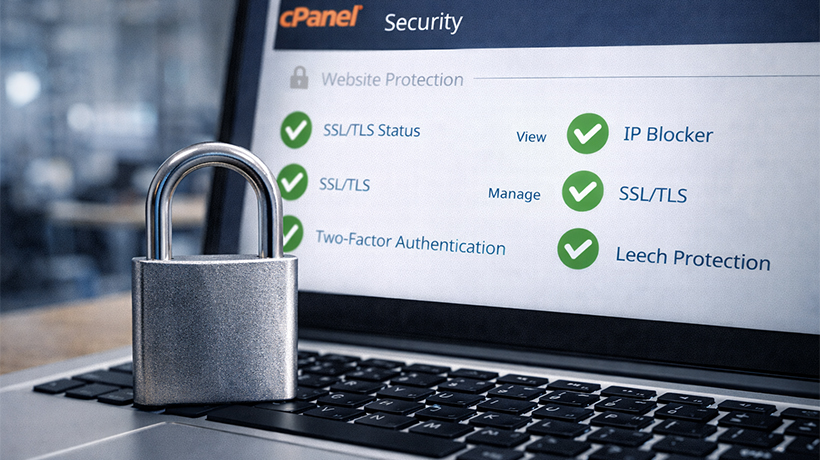
Protecting your website from cyberattacks such as malware, ransomware, and other online threats takes time and effort. That is why many businesses choose web hosting with cPanel. It gives you an easy way to manage your website while also giving you access to useful security features.
cPanel helps you handle daily tasks such as managing files, databases, domains, and email accounts through a simple dashboard. In this guide, we’ll look at the security tools cPanel offers and the types of cPanel hosting available for businesses.
How cPanel Helps Protect Your Website
Keep cPanel Updated
Running an outdated version of cPanel can put your website at risk. Older versions may contain security weaknesses that attackers can exploit. You may also miss new features, bug fixes, and security improvements.
Update cPanel regularly so your website stays protected and performs well.
Use Strong Passwords and Change Them Often
Strong passwords protect every entry point to your website. Weak passwords make it easier for attackers to gain access and install malicious code.
cPanel includes a password generator, which makes it easier to create secure login details. You should also update your passwords regularly to reduce risk.
Password-Protect Sensitive Directories
Your main account password matters, but it should not be your only line of defence. You should also protect sensitive directories with their own usernames and passwords.
This feature limits access to selected areas of your website. When someone tries to open a protected directory, they must enter valid login details before they can continue. This keeps private content away from unauthorised visitors.
Enable cPHulk Brute Force Protection
cPHulk helps protect your server from brute-force attacks. These attacks happen when hackers use automated tools to guess usernames and passwords through repeated login attempts.
cPHulk detects suspicious behaviour and lets you block the IP addresses involved. This stops repeated login attempts and reduces the chance of a successful attack.
Turn On Hotlink Protection
Hotlinking happens when another website links directly to files hosted on your site, such as images. When their visitors load those files, your server uses your bandwidth to deliver them.
This can waste resources and slow down your website. cPanel lets you enable hotlink protection so other websites cannot use your files this way.
Types of Web Hosting with cPanel
Shared cPanel Hosting
Shared web hosting with cPanel places multiple websites on one server. It is a popular choice for new businesses, freelancers, and low-traffic websites because it is affordable and easy to use.
With cPanel, you can manage website files, email accounts, domains, and DNS settings from one place. However, you still share server resources with other users, which can affect performance and security.
Dedicated Web Hosting with cPanel
Dedicated hosting gives your website its own private server. That means you get full access to the server’s resources, along with more storage and computing power.
cPanel makes dedicated hosting easier to manage. It also works well for reseller hosting because you can assign space, access, FTP accounts, and tools to each customer. Since no other users share the server, you also benefit from stronger isolation and better security.
VPS cPanel Hosting
A VPS, or virtual private server, sits on a server with other users, but your website runs in its own isolated environment. This gives you more control and better performance than shared hosting.
With cPanel, you can manage domains, install software, create email accounts, and handle backups with ease. Because your RAM, CPU, and storage are reserved for your environment, VPS cPanel hosting often delivers faster and more consistent performance.
WordPress cPanel Hosting
WordPress hosting can run on shared, VPS, or dedicated infrastructure, but providers usually optimise it specifically for WordPress websites.
cPanel makes WordPress management simpler. You can manage files, databases, email accounts, backups, and security settings through a visual dashboard instead of using command-line tools. This makes it a good choice for users who want control without extra complexity.
Why Partner with Ethernet Servers?
Ethernet Servers offers web hosting with cPanel for freelancers, growing businesses, and larger organisations. cPanel gives you a user-friendly interface, reliable tools, and practical features that make website management much easier.
We also understand that website security needs ongoing attention. That is why we provide robust cPanel security features to help protect your site from common threats. Our goal is to make website security and management easier, even for users without a technical background.
When your website feels secure and well managed, you can focus on growth with more confidence. With Ethernet Servers, you get dependable support and a platform that helps you manage your site smoothly.
Conclusion
Choosing the right hosting platform plays a big role in your website’s long-term success. Web hosting with cPanel gives you a strong mix of control, convenience, and security.
Whether you choose shared hosting, VPS hosting, dedicated hosting, or WordPress hosting, cPanel helps you manage your website more efficiently. If you want an easier way to stay on top of security, performance, and everyday tasks, web hosting with cPanel is a smart choice for 2026 and beyond.
Frequently Asked Questions
What are the benefits of web hosting with cPanel?
cPanel is a Linux-based web hosting control panel that makes website and server management easier. It gives you a simple graphical interface, so you can manage important tasks without using complex command-line tools.
Why is securing cPanel important?
An insecure cPanel server can lead to data breaches, malware infections, financial losses, and compliance problems. Strong security settings help reduce these risks.
When do you need cPanel for WordPress?
You may want cPanel for WordPress if you want more control over your hosting account. cPanel lets you manage databases, email accounts, backups, server settings, and security features in one place.
Can I install WordPress without cPanel?
Yes, you can install WordPress without cPanel by using FTP or other one-click installers. However, cPanel makes installation and management much easier. At Ethernet Servers, we can handle the WordPress installation for you, so you do not need advanced technical skills to get started.